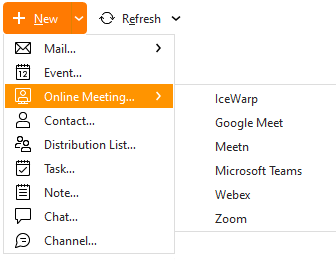
If you’d like to directly start an Online Meeting to quickly set up an unscheduled, ad hoc call, you can go to New > Online Meeting > then select your Online Meeting Provider.
This will create an online meeting room within the service of the online meeting provider. You can then add more people to the call directly within the online meeting service.
Note for MS Teams users, using this method will automatically record an event for the current time called “Instant Meeting” in your associated Teams account Calendar, or the Calendar of your default eM Client account.
If you don't have an Online meeting provider set up in your eM Client, you can do so in Menu >Settings >Online Meetings, read more about the options here.